New update for Technitium MAC Address Changer is available for direct download and via Automatic Updates. You can download the complete setup from here. Separate update is available to download from here.
Official torrent for the complete setup can be downloaded from this magnet url.
The software will check for update automatically as per a fixed schedule. If you want the update before the automatic update triggers, just start the software, click on Help > Check For Software Updates menu to get it done instantly.
This update fixes minor bugs including an error that occurs while updating OUI file into local database from IEEE.ORG.
If you find any problem with the latest update just post a comment below. You may send screenshot(s) of the software if there is any critical issue to support (at) technitium (dot) com.
Sunday, March 22, 2015

Tuesday, June 10, 2014
Fixing Wrong Original MAC Address in TMAC
If you believe TMAC is displaying incorrect original MAC address then you can fix this by using following command:
tmac -n <network-adapter-name> -ro
Where, <network-adapter-name> will be the name of your network adapter you wish to fix the issue for.
Checkout this link for more info on TMAC command line options.
Note: Make sure that you run CMD.exe as administrator. To do so, right click on the CMD icon and click 'Run as administrator' option. Also use the CD command first to change the directory to where TMAC is installed to be able to run the "tmac" command.
tmac -n <network-adapter-name> -ro
Where, <network-adapter-name> will be the name of your network adapter you wish to fix the issue for.
Checkout this link for more info on TMAC command line options.
Note: Make sure that you run CMD.exe as administrator. To do so, right click on the CMD icon and click 'Run as administrator' option. Also use the CD command first to change the directory to where TMAC is installed to be able to run the "tmac" command.
Sorting TMAC Installation Failure
In certain scenario, its possible that TMAC fails to install due to misconfiguration or missing components on your computer. This small post will describe how to resolve this issue.
You will first need to uninstall TMAC completely from your system if it got partially installed. Check files in the installation folder that you can find under Program Files (x86) folder and delete them. You then have to find and delete following files from your computer:
MSCHRT20.OCX
MSCOMCTL.OCX
TABCTL32.OCX
After deleting above files, run the TMAC installer again. The above method should fix the installation issue.
You will first need to uninstall TMAC completely from your system if it got partially installed. Check files in the installation folder that you can find under Program Files (x86) folder and delete them. You then have to find and delete following files from your computer:
MSCHRT20.OCX
MSCOMCTL.OCX
TABCTL32.OCX
After deleting above files, run the TMAC installer again. The above method should fix the installation issue.
Saturday, December 21, 2013
Technitium.com Listed In Nmap's 'Icons of the Web' Project!
The Nmap Project released the 'Icons of the Web' project, which is a 5 gigapixel image containing favicon of popular websites (as ranked by Alexa).
I am happy to announce that Technitium.com is listed as a popular favicon in the 5 gigapixel image!
The icons are scaled in the image as per each site's monthly reach (popularity).You can have a look at the image here: http://nmap.org/favicon/?search=technitium.com
The project is an update to a similar project Nmap had performed in 2010. It was very popular and was mentioned in the New York Times and also got its place in Guinness Book of World Records.
I am happy to announce that Technitium.com is listed as a popular favicon in the 5 gigapixel image!
The icons are scaled in the image as per each site's monthly reach (popularity).You can have a look at the image here: http://nmap.org/favicon/?search=technitium.com
The project is an update to a similar project Nmap had performed in 2010. It was very popular and was mentioned in the New York Times and also got its place in Guinness Book of World Records.
Thursday, October 31, 2013
Technitium.com Hosting Down Temporarily [Updated]
Technitium.com is down due to issue at web hosting service provider end. The site will be made working as soon as new web hosting provider is selected.
Mean while you can download Technitium MAC Address Changer via Torrent or via Download.com
Will update the status on this soon.
Update:
Website is up and running with exception to file downloads. You can download the latest version from Download.com.
Mean while you can download Technitium MAC Address Changer via Torrent or via Download.com
Will update the status on this soon.
Update:
Website is up and running with exception to file downloads. You can download the latest version from Download.com.
Sunday, October 20, 2013
Technitium MAC Address Changer v6.0.5 Released
New update for Technitium MAC Address Changer is available for direct
download and via Automatic Updates. You can download the complete setup
from here. Separate update is available to download from here.
Official torrent for the complete setup can be downloaded from here.
The software will check for update automatically as per a fixed schedule. If you want the update before the automatic update triggers, just start the software, click on Help > Check For Software Updates menu to get it done instantly.
This update fixes minor bugs including an error that occurs while updating OUI file into local database from IEEE.ORG.
If you find any problem with the latest update just post a comment below. You may send screenshot(s) of the software if there is any critical issue to support (at) technitium (dot) com.
Official torrent for the complete setup can be downloaded from here.
The software will check for update automatically as per a fixed schedule. If you want the update before the automatic update triggers, just start the software, click on Help > Check For Software Updates menu to get it done instantly.
This update fixes minor bugs including an error that occurs while updating OUI file into local database from IEEE.ORG.
If you find any problem with the latest update just post a comment below. You may send screenshot(s) of the software if there is any critical issue to support (at) technitium (dot) com.
Sunday, July 14, 2013
Technitium MAC Address Changer v6.0.4 Released
New update for Technitium MAC Address Changer is available for direct
download and via Automatic Updates. You can download the complete setup
from here. Separate update is available to download from here.
Official torrent for the complete setup can be downloaded from here.
The software will check for update automatically as per a fixed schedule. If you want the update before the automatic update triggers, just start the software, click on Help > Check For Software Updates menu to get it done instantly.
This update fixes minor bugs including an error that occurs while updating OUI file into local database from IEEE.ORG.
If you find any problem with the latest update just post a comment below. You may send screenshot(s) of the software if there is any critical issue to support (at) technitium (dot) com.
Official torrent for the complete setup can be downloaded from here.
The software will check for update automatically as per a fixed schedule. If you want the update before the automatic update triggers, just start the software, click on Help > Check For Software Updates menu to get it done instantly.
This update fixes minor bugs including an error that occurs while updating OUI file into local database from IEEE.ORG.
If you find any problem with the latest update just post a comment below. You may send screenshot(s) of the software if there is any critical issue to support (at) technitium (dot) com.
Tuesday, January 8, 2013
TMAC Crosses 1 Million Downloads On Download.com
Technitium MAC Address Changer (TMAC) crossed 1 million downloads on C|NET Download.com this week!
 |
| TMAC 1 Million Downloads |
Sunday, September 2, 2012
Privacy And The Internet
There have been a lot of queries about MAC address and privacy on blog comments as well as in emails that I get from many users of TMAC. Reading this post should clear most queries that you have.
MAC Address & Privacy
A website on Internet cannot find your MAC address by any means. Your MAC address stays in the local network you are connected to (like LAN) and so technically only a website hosted on the same LAN network can find the visitor's MAC address.
So changing MAC address would give you privacy only at local network level. Nobody will be able to track your presence on the wifi networks that you connect to with a new MAC address being used every time.
This Website Wants To Know Your Location!
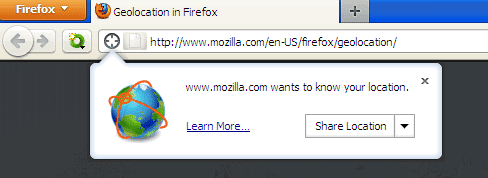
One thing you must note that MAC address of your wifi access point or any other access point that is in your range will be disclosed when your web browser asks to share your location information and you click Share Location.
A web browser will compile a list of all the wifi hotspots in range and read their BSSID (MAC Address of station in an Access Point) with the signal strength and send it over to the website asking for it. The website uses a database of known MAC addresses with their location, combined with your IP address and try to figure out your location based on the signal strength [1][2]. In popular/commercial places the location can be as accurate as 25 meters. You can read more about it in this earlier post.
IP Address Based Location Mapping
IP address is commonly used to find the visitors location. Its pretty straight forward for a website to find a visitor's IP address. Using commercially available databases that map IP address to location, websites can provide region specific services to the visitors or just compile stats for visitor traffic analysis. The database can provide location up to the City the visitor is from. The database can be wrong at times due to IP address blocks being reassigned to another location but in most case, the country can be reliably identified.
If you are more paranoid about your IP address being disclosed, you can use Tor. Tor can be painfully slow at times but it does provide a level of anonymity for free. If you have some cash at hand, you can go for Virtual Private Network (VPN) services. These services will carry all your Internet data through their own network such that your IP address hides behind their data center IP address.
How Are You Being Tracked?
Most common way of tracking users is by storing identification data on user's computer known as Cookies. Web browser accept and store cookies that any website sends back. Cookies can easily be deleted with most web browsers. You can configure your web browser to clear cookies when the browser closes.
Cookies being easy to delete, websites and advertisement networks found new ways to track users. With most Internet connected computers having Adobe Flash installed, it became a new way to restore the deleted cookies. Adobe Flash Player allows to store cookies which cannot be deleted by clearing browser cookies. Users can however delete flash cookies manually by using Flash Player's Website Storage Settings Panel. Obviously, deleting flash cookies is difficult and most users are not even aware of the existence of a separate flash cookie.
Another way is by means of HTTP ETag. ETag was designed to enable smart web caching but can easily be used to track visitors. Each web resource (images, html etc) that browser stored in its cache can be identified by website supplied ETag. The only way to get rid of this is to clear your browser cache just like you clear cookies.
How Do I Protect My Privacy?
I would recommend you to use Firefox web browser and install following add-ons:
1. Better Privacy - It clears flash cookies when browser closes.
2. Certificate Patrol - It can prevent a very rare man in the middle attack on HTTPS websites.
3. HTTPS-Everywhere - It will add "https" automatically to URLs that you enter in browser forcing browser to use HTTPS even when you forget to enter proper https URL (works for popular websites only).
4. NoScript - Recommended only for advance users. It will block javascripts/flash from unauthorized websites. You can decide which sites can use javascript/flash easily.
You can even use Firefox Profile feature. Its possible to create multiple "profiles" in Firefox, each profile being completely separate, having its own cache, cookies, history, add-ons etc. To do so, just go to Run (Start > Run or press Win+R) and enter firefox -p -no-remote and you will see a profile manager window. It can be very convenient to create a shortcut with the mentioned command line parameters for use every time.
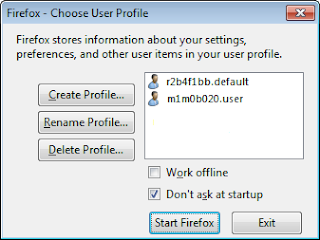
Note that for each profile you create, you will need to install all the add-ons mentioned above separately. Using separate profiles, its possible to log in into different Google accounts in same browser without linking them together.
References:
1. Location-Aware Browsing - Mozilla Firefox
2. Location sharing - Google Chrome
Edit:
Read more about Ad networks tracking stats. You are always being tracked (stalked) by multiple Ad networks!
MAC Address & Privacy
A website on Internet cannot find your MAC address by any means. Your MAC address stays in the local network you are connected to (like LAN) and so technically only a website hosted on the same LAN network can find the visitor's MAC address.
So changing MAC address would give you privacy only at local network level. Nobody will be able to track your presence on the wifi networks that you connect to with a new MAC address being used every time.
This Website Wants To Know Your Location!
One thing you must note that MAC address of your wifi access point or any other access point that is in your range will be disclosed when your web browser asks to share your location information and you click Share Location.
A web browser will compile a list of all the wifi hotspots in range and read their BSSID (MAC Address of station in an Access Point) with the signal strength and send it over to the website asking for it. The website uses a database of known MAC addresses with their location, combined with your IP address and try to figure out your location based on the signal strength [1][2]. In popular/commercial places the location can be as accurate as 25 meters. You can read more about it in this earlier post.
IP Address Based Location Mapping
IP address is commonly used to find the visitors location. Its pretty straight forward for a website to find a visitor's IP address. Using commercially available databases that map IP address to location, websites can provide region specific services to the visitors or just compile stats for visitor traffic analysis. The database can provide location up to the City the visitor is from. The database can be wrong at times due to IP address blocks being reassigned to another location but in most case, the country can be reliably identified.
If you are more paranoid about your IP address being disclosed, you can use Tor. Tor can be painfully slow at times but it does provide a level of anonymity for free. If you have some cash at hand, you can go for Virtual Private Network (VPN) services. These services will carry all your Internet data through their own network such that your IP address hides behind their data center IP address.
How Are You Being Tracked?
Most common way of tracking users is by storing identification data on user's computer known as Cookies. Web browser accept and store cookies that any website sends back. Cookies can easily be deleted with most web browsers. You can configure your web browser to clear cookies when the browser closes.
Cookies being easy to delete, websites and advertisement networks found new ways to track users. With most Internet connected computers having Adobe Flash installed, it became a new way to restore the deleted cookies. Adobe Flash Player allows to store cookies which cannot be deleted by clearing browser cookies. Users can however delete flash cookies manually by using Flash Player's Website Storage Settings Panel. Obviously, deleting flash cookies is difficult and most users are not even aware of the existence of a separate flash cookie.
Another way is by means of HTTP ETag. ETag was designed to enable smart web caching but can easily be used to track visitors. Each web resource (images, html etc) that browser stored in its cache can be identified by website supplied ETag. The only way to get rid of this is to clear your browser cache just like you clear cookies.
How Do I Protect My Privacy?
I would recommend you to use Firefox web browser and install following add-ons:
1. Better Privacy - It clears flash cookies when browser closes.
2. Certificate Patrol - It can prevent a very rare man in the middle attack on HTTPS websites.
3. HTTPS-Everywhere - It will add "https" automatically to URLs that you enter in browser forcing browser to use HTTPS even when you forget to enter proper https URL (works for popular websites only).
4. NoScript - Recommended only for advance users. It will block javascripts/flash from unauthorized websites. You can decide which sites can use javascript/flash easily.
You can even use Firefox Profile feature. Its possible to create multiple "profiles" in Firefox, each profile being completely separate, having its own cache, cookies, history, add-ons etc. To do so, just go to Run (Start > Run or press Win+R) and enter firefox -p -no-remote and you will see a profile manager window. It can be very convenient to create a shortcut with the mentioned command line parameters for use every time.
Note that for each profile you create, you will need to install all the add-ons mentioned above separately. Using separate profiles, its possible to log in into different Google accounts in same browser without linking them together.
References:
1. Location-Aware Browsing - Mozilla Firefox
2. Location sharing - Google Chrome
Edit:
Read more about Ad networks tracking stats. You are always being tracked (stalked) by multiple Ad networks!
Sunday, March 11, 2012
Technitium MAC Address Changer v6.0.3 Released
New update for Technitium MAC Address Changer is available for direct download and via Automatic Updates. You can download the complete setup from here. Separate update is available to download from here.
Official torrent for the complete setup can be downloaded from here.
The software will check for update automatically as per a fixed schedule. If you want the update before the automatic update triggers, just start the software, click on Help > Check For Software Updates menu to get it done instantly.
The update fixes minor bugs with IP and DNS settings. A new option to display network traffic speed in bytes/second instead of bits/second is available under the Options menu.
If you find any problem with the latest update just post a comment below. You may send screenshot(s) of the software if there is any critical issue to support (at) technitium (dot) com.
Official torrent for the complete setup can be downloaded from here.
The software will check for update automatically as per a fixed schedule. If you want the update before the automatic update triggers, just start the software, click on Help > Check For Software Updates menu to get it done instantly.
The update fixes minor bugs with IP and DNS settings. A new option to display network traffic speed in bytes/second instead of bits/second is available under the Options menu.
If you find any problem with the latest update just post a comment below. You may send screenshot(s) of the software if there is any critical issue to support (at) technitium (dot) com.
Subscribe to:
Posts (Atom)