You probably may have read an influential blog post
Against DNSSEC
and another one that follows it
14 DNS Nerds Don't Control The Internet
by
Thomas H. Ptacek
and may have dismissed DNSSEC as unnecessary. I am calling it influential
since this blog post comes up frequently at any debates that you may find
online regarding DNSSEC, is
listed in wiki articles, and also had an influence on me. If you haven't read both of them, I would
highly recommend that you read them before reading this blog post to help to
understand a lot of context. There is also a
FAQ blog post
for the original Against DNSSEC blog post that is also recommended to be read.
There is also a recent
Twitter thread
by
Thomas H. Ptacek
which is a good read.
You may also like to read this recent
Mastodon thread
by
Rich Felker who
argues for DNSSEC and also an old
For DNSSEC
blog post by Zach Lym which is a rebuttal to the "Against DNSSEC" blog post.
In this blog post, based on my experience of implementing DNSSEC, I am
attempting to make an argument for DNSSEC taking points from the original
Against DNSSEC
blog post while comparing it with
Public Key Infrastructure (PKI), and make a case for
DNS-based Authentication of Named Entities (DANE)
adoption.
Note that DNSSEC and DANE are an alternative to PKI system and both of them
use the same
Transport Layer Security (TLS)
for security.
But First, What Is DANE?
Before discussing DNSSEC, lets take a look at DANE to better understand the
arguments being made. Many people know about DNSSEC but are unaware about DANE
and even when they are aware, they do not know about its features or have
misconceptions about it. Lets see what DANE is about in brief.
-
DANE is an alternative for the PKI system that can co-exists with it. DANE
uses TLSA resource record in the DNS which can include hash values for a PKI
certificate or the hash value of its public key component. DANE TLSA records
are signed by DNSSEC and are validated by clients before connecting to the
TLS service. Implementing DANE support does not mean removing PKI support
for any software or service. Which means, a website can implement PKI
certificate, or DANE, or both together.
-
The TLSA record can contain a full certificate but the common usage is to
just store the hash values for either the full certificate or just the
public key so as to prevent IP fragmentation of the UDP DNS response.
-
DANE provides 4 modes of operation
by publishing a TLSA record for a domain name:
-
PKIX-TA: This mode allows specifying which 3rd party PKI
Certificate Authorities (CA) are allowed to issue certificates for the
service the client is connecting to. The client also needs to perform
PKI certificate chain validation. This may look similar to the
CAA record
but is actually validated by the client before making the TLS
connection. Whereas CAA record is checked by a CA to know if they are
allowed to issue a certificate for the domain name to prevent
mis-issuance.
-
PKIX-EE: This mode allows specifying the end entity certificate,
that is, the certificate deployed by the service. The client has to
match the received certificate with DANE TLSA record and also perform
usual PKI certificate chain validation.
-
DANE-TA: This mode allows specifying a Trust Anchor for a CA
certificate that may not be listed in the client's collection of
installed certificates. Using this, an enterprise running their own
internal root CA can be validated by the clients without requiring to
install the root CA certificate locally. The client is required to
perform PKI certificate chain validation below the specified Trust
Anchor.
-
DANE-EE: This is known as "domain-issued certificate" since it
allows for a domain owner to issue a certificate for a service without
involving a 3rd party CA. The TLS certificate on the service must match
with the DANE TLSA record and PKI certificate chain validation is not
required to be performed by the client.
-
When using DANE-EE mode, its possible for a web server to
host one or more web sites
with a single TLS self-signed certificate. This is since, the domain in the
URL is not matched with the subject in the certificate for DANE-EE but only
the certificate or its public key is validated. This means that a web
browser supporting DANE does not technically need to include a
Server Name Indication (SNI)
extension in the TLS handshake with DANE-EE and thus there is no need for
using
Encrypted Client Hello (ECH), a new extension that is being
standardized, for such a deployment.
-
The most useful feature of DANE that PKI cannot provide is that it protects
email by ensuring that SMTP protocol uses TLS preventing downgrade attacks.
Websites can be authenticated based on the CA certificate that was issued
for the domain name but, such mechanism does not work with email since SMTP
uses opportunistic encryption (STARTTLS) which an on-path attacker can
easily downgrade to force transmission of email in plain text. When a domain
owner deploys DANE for their email gateways, the sender can validate the
DANE TLSA record and will attempt to send email only with TLS (STARTTLS)
after ensuring that the certificate received is valid as per DANE TLSA
record.
Is DNSSEC Unnecessary?
All secure crypto on the Internet assumes that the DNS lookup from names to IP
addresses are insecure. Securing those DNS lookups therefore enables no
meaningful security. DNSSEC does make some attacks against insecure sites
harder. But it doesn’t make those attacks infeasible, so sites still need to
adopt secure transports like TLS. With TLS properly configured, DNSSEC adds
nothing.
-
Against DNSSEC
If the secret DNSSEC keys leaked on Pastebin tomorrow, it’s unlikely that
anything would break.
-
14 DNS Nerds Don't Control The Internet
This argument is kind of true at the moment since DNSSEC is not being
effectively used as its is not mass adopted yet for various reasons. While all
of the web today is protected by PKI despite a lot of problems with it.
There are hundreds of Root Certificate Authorities (CA) that are trusted by
major web browsers and Operating Systems. Many of them are based in countries
of questionable intent. A single compromised CA is capable of issuing
certificates for any domain name, allowing
Man In The Middle (MITM)
attacks that effectively makes the entire PKI system fragile.
The most recent example being a little known Panama registered company called
TrustCor Systems which was a root CA trusted by major web browsers, that
has ties with U.S. intelligence and law enforcement. Not just that, they have been
accused of distributing malware SDK in Google Play Store. This revelation caused it to be dropped by
Mozilla
and
Microsoft
recently. This is not a first instance of such a compromise but only a recent
one.
Another popular example is that of
DigiNotar
discovered in 2011 which clearly indicates that this has been a known and
unfixed issue since a long time.
There are several problems with how
Domain Validated (DV) certificates
are issued. Earlier, the most common way to issue a DV certificate was to
verify email address for the domain name while the SMTP protocol used to send
email, was itself known to be insecure. The current popular method uses plain
text HTTP challenge or DNS challenge to prove domain name ownership where you
need to prove that you either control port 80 with HTTP protocol for the
domain name, or that you can add a TXT record in DNS for it. No matter what
method is used, it ultimately depends upon DNS infrastructure in one way or
the other for verification.
You don't have to be NSA or GCHQ to be able to acquire a DV certificate for a
domain name. An attacker in position of being on-path, that is, between the CA
and the domain owner's DNS or web server will be able to get himself issued a
DV certificate. This is not an imaginary scenario and such kind of
attacks have already occurred
that used BGP attacks and could have been prevented with DNSSEC and DANE. Yes,
contrary to what is
believed, DNSSEC with DANE is not affected by BGP attacks. This is due to the fact
that even if the attacker is able to hijack your IP addresses, they still do
not have access to the DNSSEC private keys to be able to break DANE. Whereas,
in the mentioned attack, the attackers were able to obtain new TLS
certificates from a CA using the hijacked IP addresses.
Is DNSSEC A Government-Controlled PKI?
To understand this, you need to know who controls the private keys used to
sign the zone. The Root zone is managed by
ICANN
and they hold the keys and organize
Root Signing Ceremony
to ensure transparency. The Root zone signs DS records for each signed
Top-level Domain (TLD)
that holds the hash value of their public keys published as DNSKEY records in
the DNS.
The TLD zone's private keys are managed by the company operating it. For a
Country Code Top-Level Domain (ccTLD), the government of the country will be managing the key. For popular TLDs
like .COM or .NET, it will be the U.S. government through the operator
Verisign.
For popular ccTLD .IO, it is the government of British Indian Ocean Territory.
The private keys for an individual domain name are managed by the domain owner
either directly or via the DNS provider hosting their domain name.
With DNSSEC, it is pretty clear who controls the private keys and also keeps
the risks involved distributed. Which means while China holds private keys for
.cn ccTLD, it can only sign domain names under it.
With PKI, any Root CA can sign a certificate for any domain name. And there
are hundreds of such Root CA that you have never heard of that your web
browser trusts. And to add to that, your ISP or the network operator, that you
run your web server with can get a DV certificate issued for your domain name
easily using HTTP challenge which you may never know of unless you manually
check using
Certificate Transparency
logs. PKI system is open to all kinds of attackers in position to exploit it.
Its possible for a government that runs a ccTLD to get a DV certificate issued
irrespective of DNSSEC status of the ccTLD. I mean, they control the parent
ccTLD zone and can easily answer with name server (NS) delegation records of
their choice when a CA is trying to validate domain ownership.
Had DNSSEC been deployed 5 years ago, Muammar Gaddafi would have controlled
BIT.LY’s TLS keys.
-
Against DNSSEC
Libya has no authority over BIT.LY’s TLS certificates.
-
Questions and Answers from "Against DNSSEC"
When Muammar Gaddafi was alive, he controlled BIT.LY already and could have
easily managed to get a DV certificate issued for himself if he wanted to. So,
the argument that he had no authority over BIT.LY's TLS certificate is invalid
since he could have had a valid DV certificate issued for any use he wished.
The Thomas H. Ptacek's FAQ blog post accepts that the PKI system is broken and
needs to be replaced, but argues that DNSSEC is not better while suggesting
solutions like
Key Pinning
that can fix issues with the CA system. The Key Pinning system however has
been obsoleted in favor of
Certificate Transparency
due to several issues with it.
It needs to be understood clearly by everyone that DNS is a government
controlled naming system by definition. Whereas, PKI is controlled by private
companies all over the world and thus controlled by them, their governments,
and any attacker on the network able to get a DV certificate issued. DNSSEC
limits the control to only the governments who already and anyways have been
controlling the DNS system. Political problems cannot be solved with technical
solutions.
Is DNSSEC Cryptographically Weak?
The original DNSSEC design is two decades old; the first drafts I can find are
from 1994. Real-world DNSSEC therefore relies on RSA with PKCS1v15 padding.
The deployed system is littered with 1024-bit keys.
No cryptosystem created in 2015 would share DNSSEC’s design. A modern PKI
would almost certainly be based on modern elliptic curve signature schemes,
techniques for which have coalesced only in the last few years.
-
Against DNSSEC
The original article Against DNSSEC was published in 2015 and it was true that
DNSSEC was littered with 1024 bit RSA keys. Today, the Root zone and most TLDs
use
2048 bit keys
but you may still find some domain names using 1024 bit Key Signing Keys
(KSK). The Zone Signing Keys (ZSK) for many domain names still use 1024 bit
keys to reduce the size of DNS response but these keys are very frequently
changed.
DNSSEC now supports RSA, ECDSA P-256, ECDSA P-384, Ed25519, and Ed448
algorithms of which
ECDSA P-256 is the second most (45%) popularly deployed
algorithm after RSA (51%). RSA with a sufficient key size still has no issues
and experts say that
quantum attacks against it are very much exaggerated.
Applications like web browsers already display warning messages for
certificate issues which can be similarly used when implementing DANE where a
user will see warning when the website using DANE uses weak key sizes or
algorithms. This would in effect force the domain owners to increase the key
size to make the warnings go away.
Is DNSSEC Expensive To Adopt?
Today, DNS lookups either succeed or fail. And there are generally two reasons
a lookup fails: the name doesn’t exist, or the requestor lacks connectivity to
the Internet. Network software is built around those assumptions.
DNSSEC changes all of that. It adds two new failure cases: the requestor could
be (but probably isn’t) under attack, or everything is fine with the name
except that its configuration has expired. Virtually no network software is
equipped to handle those cases.
-
Against DNSSEC
The original argument is that DNSSEC adds two new failure cases for DNS where
you cannot be sure of the reason when a domain name does not resolve. It can
be that there are network failures, or it can be that there is an active
attack causing DNSSEC validation failure. An application like a web browser
wont be able to know the exact reason to display to the user in such cases.
However, there is a solution available currently for this problem called
Extended DNS Errors (RFC 8914). This standard adds a reasoning for why the response has failed and can
clearly indicate the underlying issue. A DNS client implementation can thus
easily find out the exact reason for failure and any software implementation
can provide correct failure description to the user. This has already been
deployed by DNS providers like Cloudflare and by many DNS Server software
vendors. You can test it out using this
online DNS Client
website which will show you the exact Extended DNS Error that was received for
the given test domain name.
Many web browsers have started to include a built-in DNS client to
support encrypted DNS protocols
like DNS-over-HTTPS. There is even a recommendation to include a DNS client
with caching support to implement the new
SVCB and HTTPS DNS resource records
that are being deployed. For web browsers to include support for DANE, they
simply need to use this already available built-in DNS client and include
DNSSEC validation for it. Using DNSSEC validation combined with Extended DNS
Errors, the web browser will now be in a position to show the correct failure
messages to the user.
Is DNSSEC Expensive To Deploy?
DNSSEC is harder to deploy than TLS. TLS is hard to deploy (look how many
guides sysadmins and devops teams write to relate their experience doing it).
It’s not hard to find out what a competent devops person makes. Do the
math.
-
Against DNSSEC
DNSSEC used to be hard to deploy due to lack of tooling available. Today, a
lot of DNS providers support DNSSEC that a domain name owner can enable just
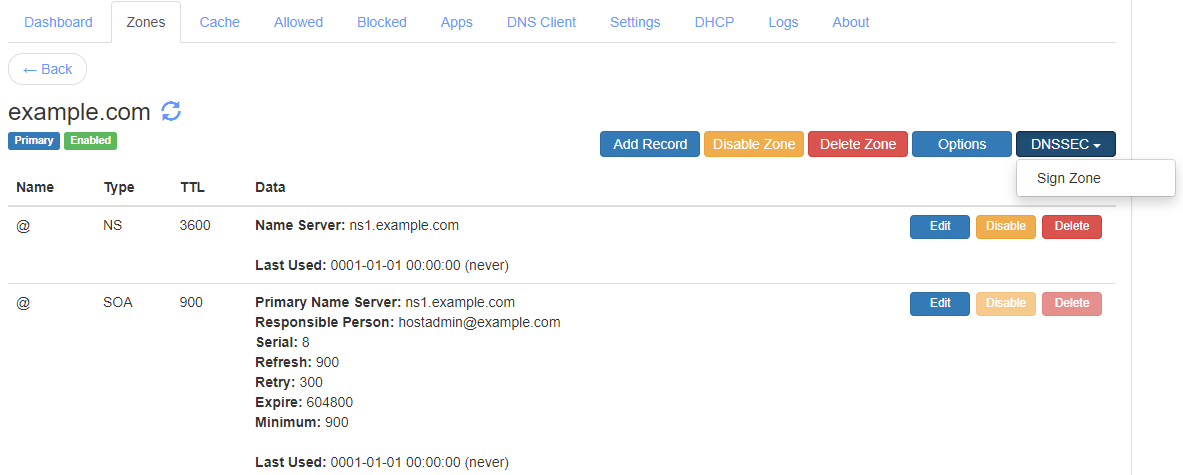
by clicking a single button. The
DNS server project
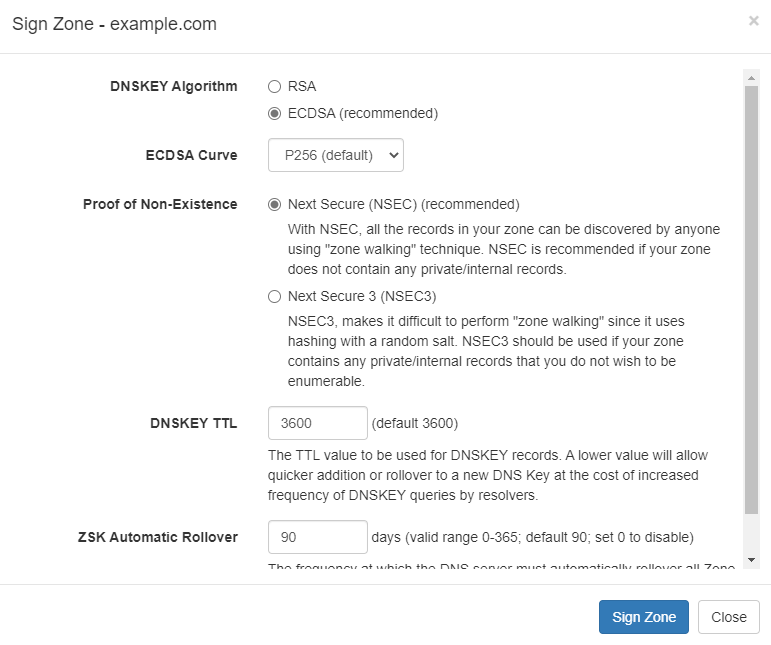
that I maintain can
enable DNSSEC in just a few clicks.
To be clear, using managed DNS services means that the private keys are
managed by the DNS provider directly and are not in the domain owner's
exclusive control. Though this is no different from the current PKI scenario
where a lot of managed hosting providers do the same by automatic certificate
provisioning and have access to your certificate's private keys. A lot of CDN
network providers already deploy certificates on behalf of their clients by
default and thus hold their private keys too.
If a domain owner wants to keep the private keys in its control, be it DNSSEC
keys or PKI certificate keys, they have to manage their own servers. Deploying
DNSSEC is similar to deploying PKI certificate if not harder. With DNSSEC, its
even possible for the domain name owner to maintain an independent, hidden
primary DNS server which holds the DNSSEC private keys and then publish the
pre-signed zone safely to 3rd party secondary DNS servers that actually answer
the DNS queries for the domain name.
Is DNSSEC Incomplete?
You’d think, for all its deployment expense, the forklifting out of
incompatible networking code, and the required adoption of a government PKI
running 1990s crypto, DNSSEC would at least nail its marginally valuable core
use case.
Nope.
DNSSEC doesn’t secure browser DNS lookups.
In fact, it does nothing for any of the “last mile” of DNS lookups: the link
between software and DNS servers. It’s a server-to-server protocol.
-
Against DNSSEC
The original argument is that DNSSEC validation is not done at the client end
point is practically true base on how things are usually deployed. Any
implementation of DNSSEC validation is usually done at the DNS resolver level
and client end points just trust the configured resolver by their network
provider.
But, DNSSEC validation is indeed end-to-end and not server-to-server like its
believed. Nothing prevents a web browser to include a built-in DNS client that does
DNSSEC validation and then use it to add support for DANE. Web browsers today
have already added
support for encrypted DNS protocols
like DNS-over-HTTPS so its very much feasible to include DNSSEC validation
support with it.
Is DNSSEC Unsafe?
DNSSEC builds on the original DNS database. So applications will need to
distinguish between secure DNSSEC records and or insecure DNS records. To
solve this problem, DNSSEC provides a cryptographically-secure “no such host”
response.
But DNSSEC is designed for offline signers; it doesn’t encrypt on the fly.
Meanwhile, there are infinite nonexistent hostnames. But all you can sign
offline are the hostnames that do exist. So to provide authenticated denial,
those signed records “chain”. You cryptographically verify that a record
doesn’t exist by observing that no other record chains to it.
-
Against DNSSEC
The argument that DNSSEC exposes all the sub domain names in a zone is valid.
This can be an issue for some deployments while can be a non-issue for others.
DNSSEC can sign records that exists but to prove non-existence of a sub domain
name or a record requires a solution like NSEC and NSEC3 that chains all sub
domain names to prove that a name does not exists between given two sorted
names in the chain. With NSEC, all the sub domain names are available in clear
text while using NSEC3, the names are hashed but an attacker with sufficient
resources can crack the hashes to find out the original names.
But, there is already a solution available to this problem that requires
online DNSSEC key signing feature where the DNS server generates
"white lies"
or
"compact lies"
NSEC records on the fly to prove non-existence of a name and thus does not
expose all the sub domain names in a zone.
This is also not an unique issue with DNSSEC. The
Certificate Transparency
system that is deployed today already exposes all your domain names that you
have issued a certificate for. You can check this publicly available data
using websites like
crt.sh for your domain names.
Is DNSSEC Architecturally Unsound?
A casual look at the last 20 years of security history backs this up:
effective security is almost invariably application-level and receives no real
support from the network itself.
-
Against DNSSEC
If an application like a web browser wants to add support for DANE with its
own DNSSEC validation then it will be doing end-to-end validation and wont be
relying on anything else.
Can’t end-systems validate DNSSEC records themselves rather than trusting
servers?
Sure they can. Everyone can also just run their own caching server. They
don’t, though, because the protocol was designed with the expectation that
they wouldn’t (this squares with the overall design of the DNS, in which stub
resolvers cooperate to reduce traffic to DNS authority servers by relying on
caching servers). DNSSEC deployment guides go so far as to recommend against
deployment of DNSSEC validation on end-systems. So significant is the
inclination against extending DNSSEC all the way to desktops that an
additional protocol extension (TSIG) was designed in part to provide that
capability.
-
Questions and Answers from "Against DNSSEC"
A web browser with a built-in DNS client that is capable of DNSSEC validation
is very much feasible. This does not require anyone to run their own caching
server either. DNS is distributed and cached at all levels which means a lot
of home users with WiFi routers are hitting the DNS cache on the router itself
when they query DNS. Also, as already mentioned, the new
SVCB and HTTPS DNS record
standard recommends clients to have support for caching to improve
performance.
The claim that
TSIG
was designed as an alternative to DNSSEC or "to extending DNSSEC all the way
to desktops" is also incorrect. TSIG was designed to allow performing
authenticated Dynamic Updates, zone transfer, and queries to recursive name
serves in limited scenarios. TSIG is not deployed to end-systems at scale
anywhere and nobody is planning for it either. TSIG only provides transaction
authentication while DNSSEC provides integrity which are completely different
properties to be interchanged.
How can DNSSEC be hard to deploy? Isn’t it easier than TLS?
This site tracks DNSSEC outages. The most important DNS zones on the Internet
don’t seem to be able to get it right. What makes us believe that the IT
department of, say, the country’s 13th biggest insurance firm will do
better?
-
Questions and Answers from "Against DNSSEC"
It is true that this is one of the issues with DNSSEC where a TLD having
DNSSEC outage can cause all domain names under it to fail to validate. But
website outages due to invalid PKI certificate issues is like extremely common
and has occurred too many times to even keep track of and thus no different.
The solution to DNSSEC outage issues is better tooling and automation that can
prevent a DNS operator from making mistakes.
Can’t DNSSEC support Elliptic Curve as well as RSA?
DNSSEC has little-used support for ECDSA using the NIST P-256 curve. The roots
and TLDs, upon which the security of the rest of the DNSSEC hierarchy depends,
don’t use it. And according to APNIC, in a post cautioning operators not to
use ECC DNSSEC, fully 1/3rd of DNSSEC-validating resolvers can’t handle ECDSA
signatures.
-
Questions and Answers from "Against DNSSEC"
DNSSEC today also supports Ed25519 and Ed448 in addition to RSA and ECDSA
algorithms. While it is true that a lot of resolvers do not support all
algorithms but if an application like a web browser wants it, it can add its
own DNSSEC validation with support for all algorithms. Note that DNSSEC
validation can be done end-to-end at the application level and is not limited
by what algorithm the resolver on the network, or DNS stub resolver in home
WiFi router supports.
Does MTA-STS Replace DNSSEC And DANE?
The other thing DNSSEC can theoretically do on an all-HTTPS Internet is help
ensure that SMTP connections use TLS: downgrade attacks on SMTP are something
people worry about. But the major mail providers came up with MTA-STS, which
works like HSTS, to replace DNSSEC.
-
Thomas H. Ptacek on Twitter
SMTP MTA Strict Transport Security (MTA-STS)
is a technology similar to
HTTP Strict Transport Security (HSTS)
where an email gateway can discover and cache a strict transport security
policy for each domain name for sending outbound emails. This is where the
similarities end.
While HSTS relies on "HSTS preloaded list", which is a list of domain names
that a web browser has preloaded and can also add a domain name to its list
when an user simply navigates to a website with a "https://" scheme in its URL
with a HSTS header in response, there is no such mechanism available for
MTA-STS. This is because with email, there is no concept of an URL and thus no
concept of an URL scheme that an user can enter while sending an email. An
user simply enters an email address of the recipient in their email client and
sends the email not knowing how the message will get routed to the
destination.
The fundamental problem with MTA-STS is that it relies upon the DNS to
discover the MTA-STS policy. If not for DNSSEC, an attacker who can control
DNS protocol at the network level of the outbound email gateway can easily
foil any protection that MTA-STS aims to provide. In fact, MTA-STS was
invented so that an attacker at the network level is prevented from performing
downgrade attack but the same attacker can control DNS too in many cases.
The first attack an adversary controlling DNS can perform on MTA-STS is to
filter any TXT requests for "_mta-sts.example.com", where "example.com" is the
domain name of the email recipient. This would prevent the outbound email
gateway from being able to discover MTA-STS policy that is being published for
the recipient's mail exchange (MX) servers. With this attack, the entire
MTA-STS security is foiled and the attacker can perform Man in the Middle
attack on the outbound SMTP connection and perform downgrade attack for
STARTTLS command.
The second attack can foil protection that MTA-STS intends to provide when a
security policy for a domain name is already in cache of the outbound email
gateway.
If a valid TXT record is found but no policy can be fetched via HTTPS (for any
reason), and there is no valid (non-expired) previously cached policy, senders
MUST continue with delivery as though the domain has not implemented
MTA-STS.
-
RFC 8461 Section 3.3
With such an implementation that follows the RFC, all an attacker has to do is
block the domain name "mta-sts.example.com" from being resolved so that the
email gateway fails to download the policy from the standard
"https://mta-sts.example.com/.well-known/mta-sts.txt" well known URL. The
attacker now just has to wait for the previously cached policy to expire after
which the email gateway will continue delivering pending emails as though the
domain has not implemented MTA-STS as per the RFC's requirements.
This second attack is very much feasible considering the "max age" published
by many services is inadequate. For example, the "max age" value published by
Google for
Gmail
is just 86400 seconds (1 day). Comparing that to HSTS, the domain
"mail.google.com" uses "strict-transport-security: max-age=10886400;
includeSubDomains" header which has max age set to 10886400 seconds (126
days). Websites publishing max age for HSTS as large as 6 months or 1 year is
quite common.
Combining both the attacks, any protection that MTA-STS provides can be
effectively defeated. The only defense that is available is with logging and
using
SMTP TLS Reporting
which is expected to be configured with MTA-STS by the recipient's email
administrator. The email gateway sending the outbound email is expected to
send a report of failures to the receiving email gateway's administrators
using either HTTPS or email transport.
A report via email transport is useless in such cases since an attacker
capable of performing downgrade attack can be expected to filter this report
email too. Thus the only secure transport for the report is HTTPS which not
everyone would have configured, for example,
Gmail has configured email transport
(v=TLSRPTv1;rua=mailto:sts-reports@google.com). A receiver of such a report is
also not capable of doing anything to fix the security issues at the sender's
end. The administrator of the sender's email gateway is expected to watch out
for logs/alerts and try to fix them.
Clearly, MTA-STS is not in a position to be a replacement for DNSSEC and DANE.
"Disadvantages of DNSSEC"
The DNS Institute has published
DNSSEC Guide
which discusses
"Disadvantages of DNSSEC"
which I believe are no longer valid today but are still believed by many
people.
-
Increased, well, everything: With DNSSEC, signed zones are larger, thus
taking up more disk space; for DNSSEC-aware servers, the additional
cryptographic computation usually results in increased system load; and
the network packets are bigger, possibly putting more strains on the
network infrastructure.
-
"Disadvantages of DNSSEC"
Disk space and computing power surely was an issue in 1990s or early 2000s
but its 2023 and is a non-issue today. There is
Extension Mechanisms for DNS (EDNS(0))
which is a required feature for implementing DNSSEC. EDNS(0) allows a DNS
request over UDP protocol to be greater than the 512 bytes limit it earlier
had. This makes it feasible to transport DNSSEC related records without
issues for most use-cases. Even when a response does not fit into UDP and
requires retransmission over TCP, its important to remember that any DNS
response that was received is cached and thus is reused many times before it
expires.
-
Different security considerations: DNSSEC addresses many security
concerns, most notably cache poisoning. But at the same time, it may
introduce a set of different security considerations, such as
amplification attack and zone enumeration through NSEC. These new concerns
are still being identified and addressed by the Internet community.
-
"Disadvantages of DNSSEC"
Amplification attack has nothing to do with DNSSEC specifically. These are
already possible without DNSSEC with just plain old DNS. There are already
mitigations against such attacks like query rate limiting and dropping known
amplification requests. Zone enumeration through NSEC already has more than
one solutions like using NSEC3 or using online signing with "white lies" or
"compact lies".
-
More complexity: If you have read this far, you probably already concluded
this yourself. With additional resource records, keys, signatures,
rotations, DNSSEC adds a lot more moving pieces on top of the existing DNS
machine. The job of the DNS administrator changes, as DNS becomes the new
secure repository of everything from spam avoidance to encryption keys,
and the amount of work involved to troubleshoot a DNS-related issue
becomes more challenging.
-
"Disadvantages of DNSSEC"
Any technology adds complexity with it. Even PKI adds complexity which
everyone has become accustomed with. DNSSEC is solving a complex problem and
no one has yet come up with a better/easier way to solve the same problem
that DNSSEC does. There are better tooling options already available that
makes DNS administrator's job easier.
-
Increased fragility: The increased complexity means more opportunities for
things to go wrong. In the absence of DNSSEC, DNS was essentially "add
something to the zone and forget". With DNSSEC, each new component -
re-signing, key rollover, interaction with parent zone, key management -
adds more scope for error. It is entirely possible that the failure to
validate a name is down to errors on the part of one or more zone
operators rather than the result of a deliberate attack on the DNS.
-
"Disadvantages of DNSSEC"
The re-signing, key rollover, interaction with parent zone, key management,
etc. tasks are already automated and require limited intervention. In fact,
I am managing my signed zones by just adding some records to the zone and
just forgetting about it.
-
New maintenance tasks: Even if your new secure DNS infrastructure runs
without any hiccups or security breaches, it still requires regular
attention, from re-signing to key rollovers. While most of these can be
automated, some of the tasks, such as KSK rollover, remain manual for the
time being.
-
"Disadvantages of DNSSEC"
KSK rollover is a manual task but its usually done just once a year and
there is no expiry date attached to it like a TLS certificate. There are
mechanisms like
CDS/CDNSKEY
currently being worked on to automate it too. Remember that before
Let's Encrypt CA
was available, everyone were used to buying TLS certificates from various
CA, manually renewing them every year, and replacing the certificates on
each and every web server/email gateway that was deployed. This also caused
extremely common issue with expired certificates which is not a case with
DNSSEC.
-
Not enough people are using it today: while it's estimated as of late
2016, that roughly 28% of the global Internet DNS traffic is validating
[5] , that doesn't mean that many of the DNS zones are actually signed.
What this means is, if you signed your company's zone today, only less
than 30% of the Internet users are taking advantage of this extra
security. It gets worse: with less than 1% of the .com domains signed, if
you enabled DNSSEC validation today, it's not likely to buy you or your
users a whole lot more protection until these popular domains names decide
to sign their zones.
-
"Disadvantages of DNSSEC"
DNSSEC
adoption
is
increasing
and the reasoning that not enough people use it so you should not bother is
a weak argument. If 1/3 users worldwide are validating DNSSEC then it still
makes sense to sign your domain names. It does not matter how many % of .com
domain names are signed, what matters is that your domain names are signed
and that many of your users do DNSSEC validation.
Conclusion
It has taken a more than a decade for DNSSEC to be designed (and redesigned)
and the root zone being signed. It has been more than a decade that root zone
is signed and yet not all TLDs are signed. DNSSEC adoption is low but has been
steadily
increasing
in last few years. The low adoption rate is simply due to not many
applications that implement it. Having popular applications like web browsers
adopt DNSSEC and DANE will result in significantly increase the adoption rate.
Many website would then start supporting PKI combined with DANE which will
immediately have an impact.
DANE surely wont displace the PKI system completely but there will be an
alternative option available for everyone which includes being able to deploy
both PKI and DANE together. This will allow people to decide on their own if
they want to use PKI, DANE, or both for their websites and services. Mass
adoption of DANE for
sending email
will help to make sure that the email is protected from downgrade attacks and
is always encrypted in transit. DANE can also be useful for enterprises to
secure their intranet resources without need to deploy an enterprise wide root
CA.
Modern Operating Systems already include a DNS stub resolver service
(Microsoft Windows has a DNS Client service, and many Linux distros have
dnsmasq or systemd-resolved daemons). These DNS stub resolvers should start
supporting DNSSEC validation by default and standards like Extended DNS Errors
if they do not currently. They should also be standardized to listen on
loopback (127.0.0.1) address so that applications like web browsers can query
the local DNS stub resolver to perform DNSSEC validation by itself and use the
Extended DNS Errors signaling. This would also help with caching DNS records
at the OS level such that each application individually does not have to
maintain a separate cache. Such a standardized local DNS stub resolver service
will help applications to support DNSSEC and DANE with ease.
DNS is the basis for Internet security which systems like PKI depend upon when
issuing certificates. DNSSEC and DANE fixes the key security issues that have
been ignored for too long. A lot of problems that DNSSEC have had in the past
are already solved today and it is quite feasible to be implemented and
deployed at scale.
So, are you for or against DNSSEC and DANE? Let me know your thoughts in the
comments section below.